Human Capital Management (HCM) Software RFP Template
Seeks a modern, integrated HCM solution that streamlines HR processes, enhances workforce management, and leverages AI capabilities.
Word · FreeDownload Template →
Paste-ready workforce management requirements for time and attendance, scheduling, forecasting, absence, pay rules and labor-law compliance, plus vendor questions and a scoring rubric.
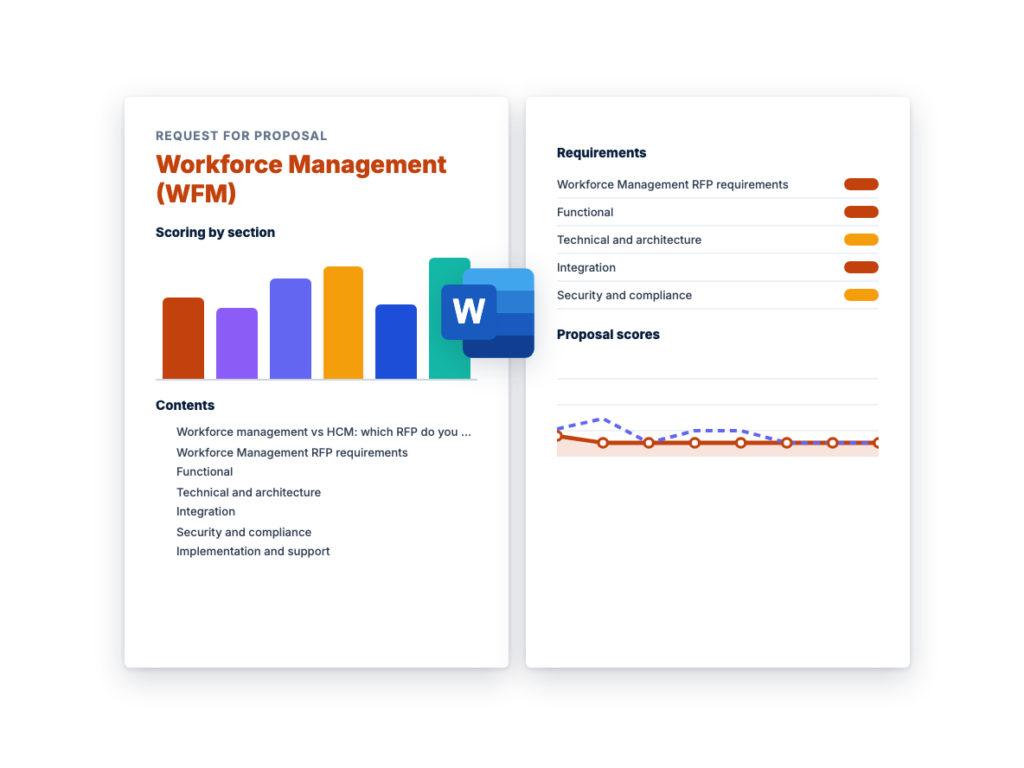
See the structure before you download. The Word file has every section listed below, ready to fill in.
The sections in the document, in order.
Use this workforce management RFP template when you're selecting software to record time and attendance, build schedules against forecast demand, manage absence, and apply your pay rules and labor-law requirements to hourly and shift-based employees.
It's written for the payroll, HR, operations and procurement team running the evaluation, and it covers the whole process: when to issue an RFI first, the requirements to send, the questions that separate vendors, and how to score the answers.
It also works as a time and attendance RFP: keep the time capture, pay rules, absence, compliance and integration requirements, and delete the forecasting and scheduling lines you don't need.
Download the editable Microsoft Word version below. Every requirement, vendor question and scoring weight on this page is in the document, ready to tailor and send.
Workforce management software touches every hourly employee's pay, so the hard part of the evaluation is writing down your pay rules, agreements and labor-law obligations precisely enough that vendors can prove they handle them. The example schedule below runs about 14 weeks from kickoff to contract award; stretch it if you have many union agreements or jurisdictions to document.
Workforce management (WFM) software covers how hourly and shift-based work is planned, recorded and turned into pay: time and attendance, scheduling, demand forecasting, absence, pay rules and labor-law compliance. Human capital management (HCM) software covers the employee record and the people processes around it: core HR, payroll, benefits, compensation, performance and talent.
Many HCM suites include a time and scheduling module, and many workforce management products are sold separately and integrate with any HCM or payroll system. If most of your employees are salaried and schedules are simple, an HCM RFP with a time-tracking section may be enough; use the HCM RFP template linked below. If you have a large hourly or shift-based workforce, complex pay rules, union agreements or several jurisdictions to comply with, run a dedicated workforce management RFP, and score your HCM vendor's own module against it alongside standalone vendors.
Signs you need a dedicated workforce management RFP:
Each line is written to paste straight into your RFP. Must-have means a vendor that cannot meet it is out; Nice-to-have earns extra points. Change the priorities to fit your situation, and delete what doesn't apply.
| ID | Requirement | Priority |
|---|---|---|
| F1 | Time capture from physical time clocks, shared kiosks, a web clock and a mobile app, with every punch landing in the same timecard. Clocks identify employees by badge, PIN or biometric reader; state which methods you support. | Must-have |
| F2 | Mobile punching with GPS geofences set per location or job site, configurable by employee group to allow, flag or block punches made outside the geofence. | Must-have |
| F3 | A configurable pay rules engine covering daily, weekly and consecutive-day overtime, shift differentials, premiums, rounding and grace periods, holiday pay, call-in and on-call pay, multiple pay rates in one workweek, and blended-rate overtime where applicable law requires it. | Must-have |
| F4 | Rules for union and collective agreements, maintained per bargaining unit: seniority-based offers of overtime and extra shifts, overtime equalization tracking, call-in minimums and contract-specific premiums. Delete this requirement if none of our employees are covered by a collective agreement. | Must-have |
| F5 | Timecard exception handling: missed punches, early or late arrivals, unapproved overtime and missed or short breaks are flagged for action before the pay period closes, with manager approval and employee sign-off workflows. | Must-have |
| F6 | Edits to timecards in closed pay periods, with automatic recalculation and export of the resulting pay adjustment to payroll as a separate, traceable entry. | Must-have |
| F7 | Attendance policy tracking (for example, points or occurrence-based policies), with manager alerts at set thresholds and configuration that keeps protected absences from counting against employees. | Nice-to-have |
| F8 | Demand forecasting from our volume drivers (for example sales, transactions, patient census, call volume or units produced), converted into staffing requirements by role and time interval using labor standards or staffing ratios. | Must-have |
| F9 | Machine-learning forecasts that account for seasonality, holidays and planned events, with forecast accuracy reported against actuals and manager overrides tracked. | Nice-to-have |
| F10 | Labor budgets in hours and cost by location and department, with budget-versus-scheduled-versus-actual tracking during the period. | Must-have |
| F11 | Schedule generation against forecast demand that respects employee availability and preferences, skills, labor rules and budget, and blocks assignments where a required license or certification is missing or expired. Managers can edit any schedule manually. Support for rotating patterns, split shifts and overnight shifts. | Must-have |
| F12 | Open-shift posting, shift bidding and shift swaps from the mobile app, with eligibility checks (skills, overtime, rest rules) before a request is approved, and a choice of manager approval or automatic approval by rule. | Must-have |
| F13 | Absence and leave management: configurable accrual policies (by tenure, hours worked, location or agreement), leave requests and approvals, balances visible to employees, and tracking of statutory and contractual leave types for [jurisdictions]. | Must-have |
| F14 | Labor-law rules configured for [jurisdictions]: meal and rest breaks, minimum rest between shifts, maximum hours, overtime thresholds, and limits on the hours and times of day minors may work. Rules apply when schedules are built and when time is recorded, with warnings before a violation occurs. | Must-have |
| F15 | Predictive scheduling (fair workweek) support for the jurisdictions in [list] that require it: advance schedule posting, tracking of changes after posting, calculation of any premiums owed for changes, and records of employee consent. Delete this requirement if none apply. | Must-have |
| F16 | Fatigue and rest rules for regulated or safety-critical roles: limits on consecutive shifts and on hours within a rolling period, minimum rest, and warnings at scheduling and at punch. Make this Must-have if any roles are subject to hours-of-service or fatigue rules. | Nice-to-have |
| F17 | An employee mobile app for iOS and Android to punch, view schedules and timecards, request time off, swap or pick up shifts, set availability and check leave balances, with push notifications for schedule changes and approvals. | Must-have |
| F18 | Labor allocation: recording time against cost centers, departments, jobs, projects or work orders, including transfers during a shift, with labor cost reported by allocation. | Must-have |
| F19 | Reports and dashboards for labor cost, overtime, absence, schedule adherence and compliance exceptions, filterable by location and manager, with scheduled delivery. | Must-have |
| F20 | AI assistance for managers and employees (for example, schedule suggestions or answers to questions about schedules, policies and balances), with each feature able to be switched off and no change applied without a person approving it. | Nice-to-have |
| ID | Requirement | Priority |
|---|---|---|
| T1 | A cloud service with production, backup and disaster-recovery hosting locations stated, and our data stored in [region]. | Must-have |
| T2 | Pay rules, accrual policies, labor-law rules and scheduling rules configured by our administrators in the application and effective-dated, without custom code. Identify any rule type that needs vendor services or scripting. | Must-have |
| T3 | A non-production environment for testing rule changes against copies of real timecards, refreshed from production on request, that receives each new release before production does. | Must-have |
| T4 | Time clocks that keep accepting and storing punches when the network or service is down, and upload them automatically when it returns. State the offline storage capacity, and whether the mobile app can record punches offline. | Must-have |
| T5 | Correct handling of overnight shifts, shifts that cross a workweek or pay-period boundary, daylight saving time changes, and employees who work in more than one time zone. | Must-have |
| T6 | Performance at peak load, such as shift change across all our sites and pay-period close. State the punch and timecard volumes you have tested. | Must-have |
| T7 | Web and mobile interfaces that meet WCAG 2.2 AA, available in [languages], with employee-facing screens and notifications in each employee's chosen language. | Must-have |
| ID | Requirement | Priority |
|---|---|---|
| I1 | Effective-dated employee data from our HCM/HRIS [system]: hires, terminations, transfers, and job, pay rate and manager changes. Failed records must be reported, not silently dropped. | Must-have |
| I2 | Export of approved hours and earnings to our payroll [system] using mapped pay codes, for every pay group and pay frequency, with a reconciliation report of hours and amounts sent per employee. | Must-have |
| I3 | Synchronization of accrual and leave balances with HCM or payroll, with one system named as the source of truth for each balance. | Must-have |
| I4 | Single sign-on with our identity provider via SAML 2.0 or OIDC, plus a secure sign-in method for frontline employees who have no corporate account or email address. | Must-have |
| I5 | Import of demand drivers from our operational systems (for example POS, ERP, EHR, contact center or production systems) by API or scheduled file. | Must-have |
| I6 | Documented REST APIs for employee, timecard, schedule and absence data, plus scheduled file exports over SFTP. | Must-have |
| I7 | Scheduled export of labor hours and cost to our ERP or general ledger by cost center, and to our data warehouse or BI tools. | Nice-to-have |
| ID | Requirement | Priority |
|---|---|---|
| S1 | A current SOC 2 Type II report and ISO/IEC 27001 certification covering the proposed services, available under NDA. | Must-have |
| S2 | Role-based access scoped by location, department and manager hierarchy, delegation of approvals when a manager is absent, and administrator access through SSO with MFA. | Must-have |
| S3 | An audit trail of every punch, timecard, schedule and accrual change showing who made it, when, the before and after values and a reason code, with an option to show employees the edits made to their own timecards. | Must-have |
| S4 | Retention of time, schedule and pay-related records for the periods required by applicable law in [jurisdictions], and export of those records on request for audits, claims or disputes. | Must-have |
| S5 | If biometric identification is used: recorded employee consent before enrollment, storage of encrypted biometric templates rather than images, a written retention and destruction schedule that meets applicable biometric privacy laws in [jurisdictions], and a non-biometric alternative for employees who decline. | Must-have |
| S6 | Location from mobile punches captured only at the moment of a punch or other employee action, not tracked continuously unless we enable it for specified roles, with employees told when location is recorded and access to location data limited by role. | Must-have |
| S7 | Encryption of our data in transit and at rest, a data processing agreement, a current list of sub-processors, and support for our privacy obligations (for example, GDPR). | Must-have |
| S8 | A contractual commitment to notify us of security incidents affecting our data within a defined time. State the time. | Must-have |
| ID | Requirement | Priority |
|---|---|---|
| M1 | A discovery phase that documents every pay rule, union agreement rule, accrual policy and scheduling rule, signed off by us before configuration starts. | Must-have |
| M2 | Parallel testing for at least [number] full pay periods, comparing hours and pay from the new system with our current process and resolving every difference before go-live. | Must-have |
| M3 | Identification of who delivers the implementation (vendor, partner or both) and the named team's experience with organizations in our industry and, where relevant, with unionized workforces. | Must-have |
| M4 | A rollout plan for time clocks and the mobile app covering site and network readiness, installation, employee enrollment (including biometric consent, if used) and employee communications. | Must-have |
| M5 | Training for payroll administrators, managers and employees in formats that suit frontline staff (short videos, in-app guidance, [languages]), plus train-the-trainer materials. | Must-have |
| M6 | An availability SLA with service credits, and 24×7 support for critical issues such as employees unable to punch or a failed payroll export, with response targets by severity. State your targets. | Must-have |
| M7 | A defined process for labor-law changes: how you notify us, which rule updates are included in the subscription, and which we must configure ourselves. | Must-have |
| ID | Requirement | Priority |
|---|---|---|
| C1 | Pricing by module (time and attendance, scheduling, forecasting, absence, analytics) and metric (for example, per employee per month), showing list price, discount and net price. | Must-have |
| C2 | A clear definition of which employees count for billing (active, seasonal, temporary, terminated during the period) and how pricing handles seasonal peaks in headcount. | Must-have |
| C3 | Time clock pricing both as a purchase and as a rental or subscription, including installation, warranty, repair and replacement terms. | Must-have |
| C4 | A cap on price increases at renewal. State the cap. | Must-have |
| C5 | Implementation priced as a fixed fee or a not-to-exceed estimate, with rates for added pay rules, integrations or sites. | Must-have |
| C6 | Exit terms covering export of all punches, timecards, audit trails, schedules and accrual balances in a usable format, and transition assistance at the end of the contract. | Must-have |
These questions are designed to separate vendors, not to collect brochure answers. Ask for evidence: a demo, a document or a reference.
Score each criterion from 1 to 5, multiply by its weight, and add the results. The weights below are a starting point; agree on your own before any proposals arrive so the scoring can't be bent around a favorite.
| Criterion | Weight | What a strong response shows |
|---|---|---|
| Time capture, pay rules and timecard accuracy | 25% | Your sample pay rules and union rules configured without custom code, correct results on every test scenario, and a complete audit trail. |
| Scheduling, forecasting and labor budgeting | 15% | Schedules built against demand that respect skills, availability and rules; forecast accuracy reported; easy manual edits for managers. |
| Labor-law, union and privacy compliance | 15% | Rules for each of your jurisdictions applied at scheduling and at punch, a clear process for law changes, and careful handling of biometric and location data. |
| Employee and manager experience | 10% | A mobile app frontline employees can use with little training for punching, swaps and time off, and fast exception handling for managers. |
| HCM and payroll integration | 10% | Working integrations with your HCM and payroll systems, a clear source of truth for each data item, and reconciliation you can audit. |
| Implementation and support | 10% | A named, experienced team, documented discovery, committed parallel testing, and support targets that protect payroll deadlines. |
| Commercials and total cost | 15% | Transparent per-module pricing, a fair definition of billable employees, clear clock hardware terms, a renewal cap and fair exit terms over a three-year view. |
| Total | 100% |
Scoring scale
Your workforce profile (employees by type, locations, jurisdictions and union agreements); requirements for time and attendance, scheduling, forecasting, absence, pay rules and labor-law compliance, marked Must-have or Nice-to-have; integration requirements for HCM and payroll; security and privacy requirements, including biometric and location data; support terms; a pricing table; and the rubric you'll score with. Attach anonymized sample pay rules and timecard scenarios so vendors answer against your situation rather than a standard demo. This template includes all of them.
A time and attendance RFP focuses on how time is recorded and turned into pay: time capture methods (clocks, kiosks, web and mobile with geofencing), pay rules and overtime, timecard exceptions and approvals, absence and accruals, audit trails, record retention and payroll export. To use this template as a time and attendance RFP, keep those requirements and delete the forecasting and scheduling lines you don't need. If you use physical time clocks, keep the hardware lines in the pricing table.
Consider both options. An HCM suite's time and scheduling module shares one employee record and one contract with the rest of your HR systems, which simplifies integration. Standalone workforce management products are worth including when you have complex pay rules, union agreements, demand-driven scheduling or many jurisdictions. Score your HCM vendor's module against this template alongside standalone vendors, and let your own pay rules and test scenarios decide.
The example schedule in this template runs about 14 weeks from kickoff to contract award, including three weeks for vendor responses and about four weeks for scripted demos and sandbox testing. Allow more time if you have many union agreements or jurisdictions to document, or if legal and privacy review of biometric clocks or mobile location data is new to your organization. Implementation and parallel payroll testing come after the award.
Seeks a modern, integrated HCM solution that streamlines HR processes, enhances workforce management, and leverages AI capabilities.
Guides organizations in selecting a comprehensive employee recognition platform that enhances company culture and engagement.
Identifies and selects a comprehensive employee engagement software solution that enables organizations to measure, enhance, and sustain workforce engagement.
Please provide your feedback below.
"*" indicates required fields