How to run a Microsoft 365 Backup RFP
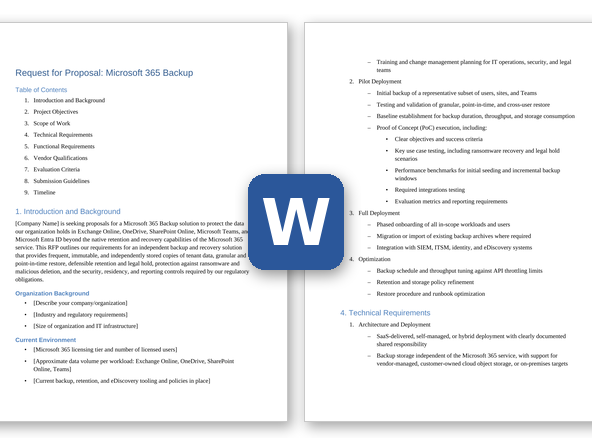
What you're really buying is the ability to restore, so agree on what you need to recover, how quickly and from how far back before vendors get involved. The example schedule below runs about 10 weeks from kickoff to contract award; stretch it if you have several tenants or a Multi-Geo tenant, or if your legal hold requirements are still being settled.
- Inventory the tenant and set recovery targets (weeks 1-2). Count what vendors will size and price against: licensed users, shared and resource mailboxes, archive mailboxes, OneDrive accounts, SharePoint sites, teams, and data volume and growth by workload. Set a recovery point objective and recovery time objective for each workload, a retention period for backups, and any legal hold obligations. List the Microsoft 365 retention policies and holds you already use, so the backup design complements them.
- Assemble the buying team. Include the Exchange, SharePoint and Teams administrators, the identity team that owns Entra ID, security operations, whoever runs backup today, and legal, records management, privacy and procurement. Bring security in early: a backup product needs tenant-wide permissions to read and restore your data, and it holds a full copy of it.
- Decide whether you need an RFI (weeks 2-3). If you haven't decided between Microsoft's native options, a vendor-hosted backup service and software you run yourself, or your long list has more than five vendors, send a short RFI first. Ask which workloads each product covers, where backup data is stored, how pricing is counted and which regions are supported. Use the answers to build a shortlist of three or four.
- Tailor and issue the RFP (weeks 3-6). Delete requirements that don't apply, adjust priorities, and add your tenant numbers to Section 1. Make Entra ID backup, Multi-Geo support and cross-tenant restore Must-haves if you depend on them. Give vendors three weeks to respond, with a written question-and-answer window in the first week.
- Score the responses (weeks 6-7). Have each evaluator score independently against the rubric before comparing notes, and set aside any vendor that misses a Must-have. For each workload, check exactly which item types are covered, and whether every 'yes' is generally available today or still on the roadmap.
- Run a proof of concept with two vendors (weeks 7-9). Use a test tenant or a pilot group, after security has reviewed the permissions each product requests. Time the first backup of a sample, then test the restores you'd need in a real incident: a single email, a full mailbox, a SharePoint site to a new location, a Teams channel, a simulated mass deletion and, if relevant, a restore into another tenant. Check that permissions, metadata and versions come back intact and that every action appears in the audit log.
- Negotiate and award (weeks 9-10). Use the pricing table to compare like for like. Settle how shared mailboxes and departed users are counted, storage limits, renewal caps and exit terms, including how you'd get your backup data out, before you sign.
Microsoft 365 Backup RFP requirements
Each line is written to paste straight into your RFP. Must-have means a vendor that cannot meet it is out; Nice-to-have earns extra points. Change the priorities to fit your situation, and delete what doesn't apply.
Functional
| ID |
Requirement |
Priority |
| F1 |
Backup of Exchange Online user, shared and resource mailboxes, including mail, calendar, contacts and tasks. State any folders, item types or mailbox types that are excluded. |
Must-have |
| F2 |
Backup and restore of Exchange Online archive mailboxes, including auto-expanding archives. State how archives are captured and restored. |
Must-have |
| F3 |
Backup of all OneDrive accounts, including files, folder structure, version history, metadata and sharing permissions. |
Must-have |
| F4 |
Backup of SharePoint Online sites, including document libraries, lists, pages, version history, metadata and permissions. State what is not captured, such as site customizations or managed metadata held outside the site. |
Must-have |
| F5 |
Backup of Microsoft Teams: team and channel settings, messages in standard, private and shared channels, 1:1 and group chats, and shared files. For each, state whether it can be restored back into Teams, to another location, or only exported. |
Must-have |
| F6 |
Backup and restore of Microsoft Entra ID objects and configuration, such as users, groups, app registrations, service principals and Conditional Access policies. State which objects and attributes are covered. Make this Must-have if you need protection for identity configuration. |
Nice-to-have |
| F7 |
Coverage of other Microsoft 365 data we use, such as Microsoft 365 Group mailboxes, Planner, OneNote notebooks and public folders. State which are protected. |
Nice-to-have |
| F8 |
Automatic discovery and protection of new mailboxes, OneDrive accounts, sites, groups and teams, using rules (for example, by group membership or site type), with alerts for anything left unprotected. |
Must-have |
| F9 |
Configurable backup frequency for each workload, with change-based incremental backups after the first full copy, and at least [number] backups per day. State the shortest supported interval for each workload. |
Must-have |
| F10 |
Point-in-time restore: browse any protected mailbox, OneDrive account, site or team as it existed at any retained backup, and restore from that point. |
Must-have |
| F11 |
Granular restore of a single email, calendar item, contact, file, file version, list item or folder, with preview before restore. |
Must-have |
| F12 |
Bulk restore of entire mailboxes, OneDrive accounts, sites or teams, one at a time or many at once, with progress tracking and a completion report. |
Must-have |
| F13 |
Restore in place (with a choice to overwrite, skip or keep both copies), to an alternate location in the same tenant, or to a different user, mailbox or site, with permissions, metadata and version history preserved. |
Must-have |
| F14 |
Restore from one Microsoft 365 tenant into another, with mapping of users, groups and sites and handling of naming conflicts. Make this Must-have if you expect a merger, divestiture or tenant consolidation. |
Nice-to-have |
| F15 |
Search across backup data by user, location, date range, sender, recipient, subject, file name, file type and keyword, limited by the searcher's role, with export of results as PST for mail and in original formats for files. |
Must-have |
| F16 |
Self-service restore for end users of their own mail and files, with optional administrator approval. |
Nice-to-have |
| F17 |
Alerts on unusual activity seen in backups, such as mass deletion or likely ransomware encryption, with help identifying the last clean restore point. |
Nice-to-have |
Technical and architecture
| ID |
Requirement |
Priority |
| T1 |
Backup copies held outside our Microsoft 365 tenant, in a separate storage location and security domain, so that a compromised Microsoft 365 administrator account cannot delete or alter them. State where each copy is stored, and whether it can be kept in a cloud storage account we own. |
Must-have |
| T2 |
Immutable backup storage: retention locks that no single administrator, ours or the vendor's, can shorten or remove before the retention period ends. |
Must-have |
| T3 |
Protection against destructive actions: deleting backups, shortening retention, disabling protection or removing a tenant requires approval from a second administrator, or a delay with alerts to named contacts. |
Must-have |
| T4 |
Choice of the region where backup data, search indexes and metadata are stored, to meet our data-residency requirements. |
Must-have |
| T5 |
Support for Microsoft 365 Multi-Geo: back up and restore users and sites in every geography of our tenant, and keep each backup in the region we specify. Make this Must-have if your tenant uses Multi-Geo. |
Nice-to-have |
| T6 |
Handling of Microsoft 365 API throttling without missed backups, for example by honoring retry instructions and using change tracking. Describe how backup jobs share API capacity with other applications in our tenant. |
Must-have |
| T7 |
Documented time for the first full backup and for incremental backups for a tenant of our size ([users], [TB] by workload), and reporting of the recovery point actually achieved per workload, user and site, with alerts on missed backups. |
Must-have |
| T8 |
Use of supported Microsoft APIs for every workload. Confirm that Exchange Online backup and restore, including archive mailboxes, does not depend on Exchange Web Services (EWS), which Microsoft is phasing out in Exchange Online starting in October 2026. |
Must-have |
| T9 |
Management of several Microsoft 365 tenants from one console, with data kept separate per tenant and administrator roles scoped by tenant. |
Nice-to-have |
Integration
| ID |
Requirement |
Priority |
| I1 |
Single sign-on to the backup console through Microsoft Entra ID using SAML 2.0 or OIDC, so our MFA and Conditional Access policies apply to backup administrators. |
Must-have |
| I2 |
Streaming of backup, restore, alert and administrator audit events to our SIEM in a documented format. |
Must-have |
| I3 |
A documented REST API, plus PowerShell or command-line tooling, for automating backup policies, restores and reports. |
Must-have |
| I4 |
Integration with our ticketing (ITSM) and security automation (SOAR) tools, so failed backups, alerts and restore requests create tickets or start response workflows. |
Nice-to-have |
Security and compliance
| ID |
Requirement |
Priority |
| S1 |
A current SOC 2 Type II report and ISO/IEC 27001 certification covering the proposed service, available under NDA. |
Must-have |
| S2 |
Certifications or contract terms required in our sector or region, such as FedRAMP authorization for US public-sector use or a HIPAA business associate agreement for US healthcare. Make this Must-have if it applies to you. |
Nice-to-have |
| S3 |
Encryption in transit and at rest, separation of our data from other customers' data, and a documented key-management approach. State whether customer-managed keys are supported. |
Must-have |
| S4 |
Role-based access control with predefined and custom roles (for example, backup operator, restore operator, legal reviewer and auditor), scoped by workload, user group or geography. |
Must-have |
| S5 |
A complete, tamper-evident audit log of administrator actions, searches, restores and exports, kept for [period] and exportable. |
Must-have |
| S6 |
Least-privilege access: a documented list of the Microsoft 365 permissions the product requests and why, and no vendor staff access to our backup data without our approval and an audit record. |
Must-have |
| S7 |
Retention policies set by workload, user group or site, including indefinite retention, that work independently of our Microsoft 365 retention policies and licenses. |
Must-have |
| S8 |
Legal hold on specified users, mailboxes, sites or teams that suspends deletion and retention expiry in backup data until released, with a report of active holds. |
Must-have |
| S9 |
Retention of backups for departed users after their Microsoft 365 license is removed or their account is deleted, for as long as our policy requires. |
Must-have |
| S10 |
eDiscovery support in backup data: saved searches, case folders, chain-of-custody records, and export in formats our legal review platform accepts. |
Nice-to-have |
| S11 |
A data processing agreement, a current list of sub-processors, the locations where our data is processed and supported, and a contractual commitment to notify us of security incidents affecting our data within a defined time. State the time. |
Must-have |
Implementation and support
| ID |
Requirement |
Priority |
| M1 |
An implementation plan covering application permissions, policy design, the order and schedule of the first full backup, restore testing before go-live, and how our existing backups stay available during the transition. |
Must-have |
| M2 |
Identification of who delivers the implementation (vendor, partner or both) and the relevant experience of the named team. |
Must-have |
| M3 |
A service-level agreement for the availability of the backup service, with service credits, and documented recovery objectives for the vendor's own platform. State how availability is measured. |
Must-have |
| M4 |
24×7 support for critical issues, including urgent help with large restores during a ransomware or mass-deletion incident, with response-time targets by severity. State your targets. |
Must-have |
| M5 |
Scheduled, automated restore tests with verification, and reports we can give auditors as evidence that backups ran, restores worked and retention was enforced. |
Must-have |
| M6 |
Advance notice when changes to Microsoft 365 or its APIs affect what the product can back up or restore, and a stated approach to supporting new Microsoft 365 features. |
Must-have |
| M7 |
A public status page, and root-cause reports for incidents that affect us. |
Must-have |
| M8 |
Administrator training and recovery runbooks for common scenarios, such as ransomware recovery and restoring a departed user's data. |
Nice-to-have |
Commercial and pricing
| ID |
Requirement |
Priority |
| C1 |
Pricing broken down by metric (per user, per protected object or per TB) and term, showing list price, discount and net price. |
Must-have |
| C2 |
A clear definition of what is billable, including how shared and resource mailboxes, departed users, unlicensed accounts and sites not owned by a user are counted. |
Must-have |
| C3 |
Storage included in the price, the cost of extra storage, any charges for restores, exports or data egress, and any costs we would pay to Microsoft or a cloud provider on top of your price. |
Must-have |
| C4 |
A cap on price increases at renewal. State the cap. |
Must-have |
| C5 |
Exit terms: export of all backup data in usable formats at the end of the contract, or read-only access until existing retention periods expire, and the cost of each. |
Must-have |
| C6 |
A proof of concept at no charge, with the vendor's engineering support. |
Nice-to-have |
Questions to ask Microsoft 365 Backup vendors
These questions are designed to separate vendors, not to collect brochure answers. Ask for evidence: a demo, a document or a reference.
- For each workload, list the item types, metadata and permissions you capture and the ones you don't. Where is this documented, and how do you tell customers when it changes?
- Which Microsoft APIs do you use to back up and restore Exchange Online mailboxes, including archive mailboxes and Microsoft 365 Group mailboxes, as Microsoft phases out Exchange Web Services? Which gaps remain, and what is your plan and date for each?
- How do you handle Microsoft 365 API throttling in a tenant of our size? What happens to backup frequency when you're throttled, and how would we see the recovery point you actually achieved?
- Where is each copy of our backup data stored: in storage you operate, in a cloud account we own, inside Microsoft 365 (for example, Microsoft 365 Backup Storage), or a combination? Which restore scenarios use which copy?
- An attacker has taken over one of our Global Administrator accounts and a backup administrator account. Walk us through what they could and could not do to our backups, and what would alert us.
- Demonstrate restoring a single Teams channel message, a private channel and a 1:1 chat. What goes back into Teams, and what is only available as an export?
- Demonstrate restoring a SharePoint site to a new location. Which permissions, metadata, versions and customizations come back, and which don't?
- Which Entra ID objects and settings do you back up? Show the restore of a deleted Conditional Access policy and an app registration. If an object was permanently deleted, what is re-created and what is lost, such as object IDs, credentials or assignments?
- Ransomware has encrypted files in [number] OneDrive accounts over two days. How does your product identify the affected files and the last clean restore point, how long would the restore take, and what is that estimate based on?
- How do you restore data from one Microsoft 365 tenant into another, including mapping users and sites and resolving conflicts? Which items don't transfer?
- How do you support Multi-Geo tenants and data residency for backup data, search indexes, metadata and support access?
- Which features in your proposal are generally available today, and which are in preview or on the roadmap? Give dates for the roadmap items.
- When Microsoft has added a workload or changed an API in the last two years, how long did it take you to support the change? Give examples with dates.
- If we leave, how do we get our backup data out, in what formats, how long would it take for our data volume, and what would it cost?
- Provide a reference customer of similar size that has completed a large restore with your product, such as a full site or bulk mailbox recovery.
Scoring rubric
Score each criterion from 1 to 5, multiply by its weight, and add the results. The weights below are a starting point; agree on your own before any proposals arrive so the scoring can't be bent around a favorite.
| Criterion |
Weight |
What a strong response shows |
| Workload coverage and restore fidelity |
25% |
Every Must-have workload and item type covered in a generally available release, with restores demonstrated live and permissions, metadata and versions intact. |
| Security, immutability and separation of backup data |
20% |
Backup copies outside the tenant's security domain, locks no single administrator can override, and least-privilege access to the tenant. |
| Backup performance and API handling |
10% |
Evidence of backup frequency and first-backup times for a tenant your size, a clear account of throttling, and no dependence on retired APIs. |
| Retention, legal hold and search |
10% |
Flexible retention independent of Microsoft 365 licenses, dependable legal hold, and search and export that legal teams can use. |
| Operations, reporting and integration |
10% |
Clear monitoring, achieved recovery point reporting, automated restore tests, and working SSO, SIEM and API integration. |
| Implementation and support |
10% |
A credible plan for the first full backup, an experienced named team, and 24×7 help during a major restore. |
| Commercials and total cost |
15% |
Transparent billable-user and storage terms, a renewal cap, and fair exit terms over a three-year view. |
| Total |
100% |
|
Scoring scale
- 5 Exceeds: meets every Must-have and most Nice-to-haves, shown in a demo or proof of concept, with a matching reference customer.
- 4 Strong: meets every Must-have and some Nice-to-haves, with clear evidence.
- 3 Adequate: meets most Must-haves; gaps have a credible workaround or a dated roadmap commitment.
- 2 Weak: misses one or more Must-haves, or the answer is vague.
- 1 Poor: does not meet the requirement, or no answer.
Frequently asked questions
What should a Microsoft 365 backup RFP include?
Your tenant numbers and recovery targets; requirements for each workload (Exchange Online, OneDrive, SharePoint Online, Teams and, if you need it, Entra ID) marked Must-have or Nice-to-have; restore options; immutability and where backup data is stored; retention, legal hold and search; security and compliance terms; support and SLA terms; a pricing table that defines who is billable; and the rubric you'll score with. This template includes all of them.
Do you need Microsoft 365 backup if you already use retention policies?
Microsoft describes its Purview retention policies as a compliance feature: they keep content in place, in the same tenant, so it can't be permanently deleted before the retention period ends and stays available for eDiscovery. A backup keeps separate copies you can restore to a chosen point in time after deletion, corruption or ransomware. Decide which restores, retention periods and storage separation you need, then check whether your current setup provides them.
Does Microsoft offer its own Microsoft 365 backup?
Yes. Microsoft 365 Backup is a separately billed, pay-as-you-go service that backs up SharePoint sites, OneDrive accounts and Exchange Online mailboxes, and Microsoft states that its backups stay within the Microsoft 365 data boundary. Microsoft also offers Microsoft Entra Backup and Recovery for directory objects. Check the current scope, retention limits and pricing in Microsoft's documentation, and score these options against the same requirements as any other proposal.
How long does a Microsoft 365 backup RFP take?
The example schedule in this template runs about 10 weeks from kickoff to contract award, including three weeks for vendor responses and about three weeks for a proof of concept. Allow more time if you have several tenants or a Multi-Geo tenant, if the first full backup of a large tenant must finish during the proof of concept, or if security review of a backup product's permissions is new to your organization.
What should you test in a Microsoft 365 backup proof of concept?
Test restores, not just backups: a single email, a full mailbox, a OneDrive account, a SharePoint site restored to a new location, a Teams channel and a simulated mass deletion. Check that permissions, metadata and version history come back intact, time each restore, and confirm that every action appears in the audit log. If cross-tenant restore or Entra ID recovery is a Must-have for you, test those too.
Further reading
Related RFP templates