Proof of Concept Template (Free, Word): Software POC Plan
A free, vendor-neutral POC template for testing finalists' software with your own data before you choose, with success criteria, test scenarios, data…
Word · FreeDownload Template →
A free, vendor-neutral request for quotation template for software renewals, IT equipment and defined services, with line-item specs, a pricing table and a vendor response sheet.
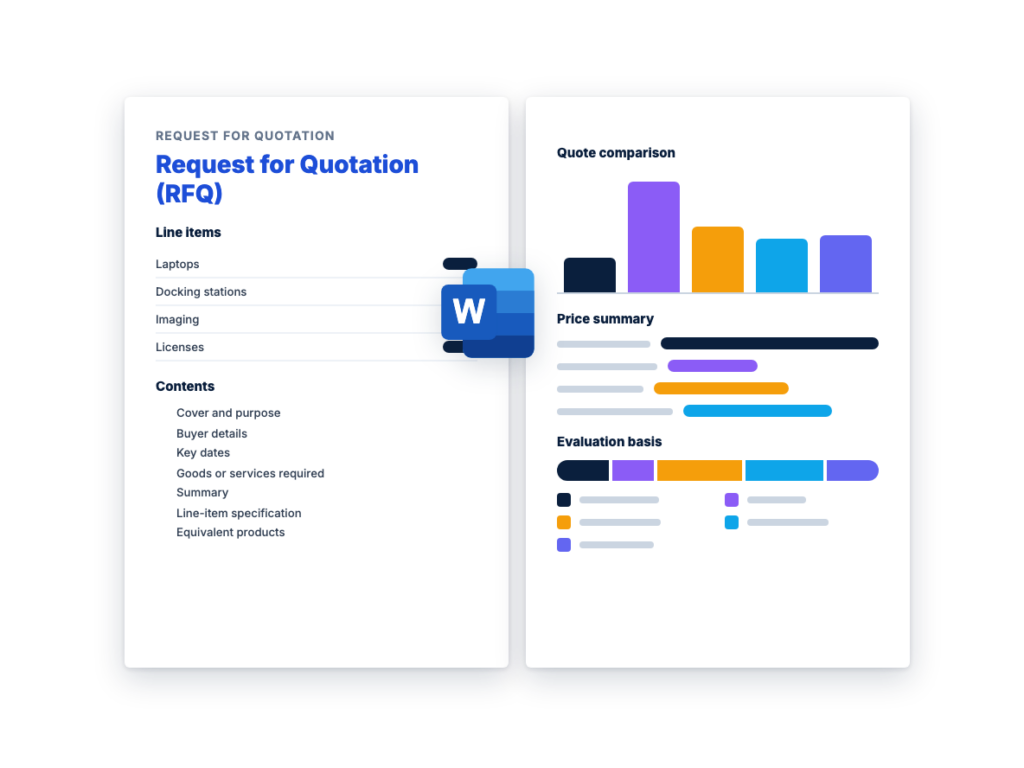
See the structure before you download. The Word file has every section listed below, ready to fill in.
The sections in the document, in order.
Use this RFQ template when you already know exactly what you need and want suppliers to compete on price and terms. Typical cases are a renewal or extra licenses for software you already run, laptops and other IT equipment to a fixed specification, and a defined service such as installation.
It's written for the procurement lead or IT manager sending the request, including first-timers. Every supplier gets the same line items and fills in the same pricing table, so the quotes come back in a form you can compare line by line.
The Word file is a complete request for quote template, not an outline. It covers the specification, delivery, quote validity, payment and warranty terms, compliance requirements, submission, evaluation, and a vendor response and signature sheet. A variant for software license renewals covers seats, term, true-up and renewal price caps.
Download the editable Microsoft Word version below. The full text is on this page, so you can read it before you download.
An RFQ is quicker to run than an RFP because suppliers only have to price a requirement you’ve already defined. The steps below follow the order of the document.
An RFQ (request for quotation, also called a request for quote) asks suppliers to price something you’ve already specified: the product, quantity, service level and delivery date. Because every compliant supplier would deliver the same thing, the decision comes down to price, delivery and terms. The supplier’s reply is called a quotation, or quote.
An RFQ is the wrong tool when you’re still learning the market. In that case, start with an RFI (see What is an RFI? and the free RFI template). It’s also the wrong tool when suppliers would meet your need in different ways and you’ll judge them on more than price. That calls for an RFP, built from a template such as the ERP software RFP template or another from the full template library.
In software and IT buying, an RFQ fits purchases like these:
An RFP asks suppliers how they would meet a need, and you score their proposals on several weighted criteria, such as functionality, implementation and support as well as price. An RFQ asks for prices on something you’ve already defined, and the decision rests mainly on price and terms.
The two often run in sequence. A company replacing its CRM might run an RFP to choose the product, starting from a template such as the CRM software RFP template, then send an RFQ to several resellers for the exact license count and term.
For the full comparison, including where an RFI fits, see RFP vs RFQ vs RFI. To plan the RFP stage, follow the RFP process, step by step.
A fair comparison starts before any quotes arrive. Every supplier should work from the same document and deadline, see every answer to every question, and know how you’ll decide. Once quotes are in, work through each one in the same order.
This is the complete text of the Word document. Fill in the [bracketed] placeholders and delete the italic guidance before you send it.
Buyer instructions: replace every [bracketed placeholder], delete
anything that doesn’t apply, and delete all italic guidance before you
send this RFQ. Keep one evaluation basis in Section 13. For software
license renewals, use Sections 4.4 and 7.3.
| Item | Details |
|---|---|
| RFQ title | [Short description, e.g. Replacement laptops for the finance team] |
| RFQ number | [RFQ-YYYY-NNN] |
| Issued by | [Organization legal name] |
| Issue date | [Date] |
| Questions due | [Date, time and time zone] |
| Quotes due | [Date, time and time zone] |
| RFQ contact | [Name, title, email] |
[Organization name] (“we”, “us”) invites [the suppliers named in the
cover email / qualified suppliers] to quote for the goods and services
described in Section 4. We have already defined what we need, so this
RFQ asks only for prices, delivery dates and terms. Every supplier is
pricing the same requirement.
This RFQ is a request for prices. It is not an order, and it does not
commit us to buy anything. We intend to award [one purchase order for
the whole requirement / purchase orders by line item] on the basis set
out in Section 13.
| Item | Details |
|---|---|
| Organization legal name | [Legal name] |
| Department or business unit | [Department] |
| Address | [Street, city, state or region, postal code, country] |
| RFQ contact (the only contact for this RFQ) | [Name, title, email, phone] |
| Purchase order and invoicing contact | [Accounts payable email or invoicing portal] |
| Tax status | [Tax-exempt: certificate provided on request / Not tax-exempt] |
| Supplier registration | [Supplier portal or registration process, if suppliers must register before we can order] |
An example schedule. Allow more time for a complex specification,
or if suppliers need special pricing from a manufacturer or
distributor.
| Step | Date |
|---|---|
| RFQ issued | [Date] |
| Questions due | [Date, time and time zone] |
| Answers sent to all suppliers | [Date] |
| Quotes due | [Date, time and time zone] |
| Expected award | [Date] |
| Required delivery or service start | [Date] |
[In one or two paragraphs, describe what you’re buying and why, and
anything a supplier needs to price it accurately: the systems or brands
you standardize on, any related contract, and timing constraints.
Example: “We need 40 laptops and 40 docking stations for staff joining
in [month], delivered imaged and asset-tagged to our [city]
office.”]
List each item on its own line, with a manufacturer part number
or SKU where you need a specific product, or minimum specifications
where you don’t. Use firm quantities, or say which ones are estimates.
The example rows show a completed RFQ for an IT equipment order; replace
them with your own.
| Line | Item | Description | Quantity | Unit | Required specifications or part number | Acceptable equivalents (Yes/No) |
|---|---|---|---|---|---|---|
| 1 | [e.g. Laptop] | [e.g. 14-inch business laptop] | [40] | [Each] | [Part number, or minimums for processor, memory, storage, display, operating system and warranty] |
[Yes] |
| 2 | [e.g. Docking station] | [Compatible with line 1] | [40] | [Each] | [Part number] | [Yes] |
| 3 | [e.g. Imaging and asset tagging] | [Load our image, apply asset tags, record serial numbers] | [40] | [Device] | [Image supplied by us by [date]; tag format [format]] | [N/A] |
| 4 | [Item] | [Description] | [Quantity] | [Unit] | [Specifications or part number] | [Yes/No] |
Where a line says Yes under acceptable equivalents, you may quote an
equal product that meets every specification listed for that line. State
its manufacturer and part number and attach its specification sheet. We
decide whether a proposed product is equal, and we may ask for a sample
or a demonstration first. Where a line says No, quote only the named
product.
Say No for items that must match what you already run, such as
spare parts and license renewals.
Quote new, genuine products supplied through the manufacturer’s
authorized channels, unless a line allows refurbished items.
Use this subsection, and the renewal pricing table in Section
7.3, when you’re renewing or adding licenses for software you already
use. Delete it otherwise.
Current agreement: [Publisher, product, agreement or contract number,
current term end date]
Current reseller: [Name, or “direct with the publisher”]
Automatic renewal: The current agreement [does / does not] renew
automatically. [Notice deadline: date.]
| Line | Product and edition | SKU or part number | License metric | Current quantity | Renewal quantity | Term | Support level |
|---|---|---|---|---|---|---|---|
| 1 | [Product, edition] | [SKU] | [Per user / device / core / instance] | [Quantity] | [Quantity] | [Start date to end date] | [e.g. Standard / Premium] |
| 2 | [Product, edition] | [SKU] | [Metric] | [Quantity] | [Quantity] | [Start date to end date] | [Support level] |
Renewal quotes must cover the following:
Start a renewal RFQ well before the term ends. Some agreements
renew automatically unless you give notice by a set date.
| Requirement | Details |
|---|---|
| Delivery address | [Address, building, floor, receiving dock] |
| Delivery date or window | [Date or date range; receiving hours] |
| Delivery terms | [Delivered to our site, freight included / for international shipments, the Incoterms rule and named place] |
| Partial shipments | [Allowed / Not allowed without our written approval] |
| Packaging and labeling | [Our purchase order number and line number on every package; packing list with serial numbers] |
| Installation | [Not required / Required: describe the work, e.g. rack, cable, power on and remove packaging] |
| Site access | [Working hours, escorts, safety induction, background checks] |
| Removal and disposal | [Removal of packaging / removal of old equipment with certified data destruction, if quoted as a line item] |
| Services schedule | [Start date, end date, working hours, location, on-site or remote] |
| Software delivery | [License keys or portal entitlements registered to [our account name and administrator contact]] |
| Acceptance | [We inspect within [5] business days of delivery or completion. Damaged, incorrect or non-conforming items are returned or corrected at your cost.] |
State your lead time for each line in the pricing table. If you can’t
meet a required date, give the earliest date you can meet. After an
order is placed, tell us in writing as soon as you know of any delay or
backorder.
Quotations must remain valid, at the prices and on the terms quoted,
for [90] days after the quote deadline.
Allow time for evaluation, internal approval and issuing a
purchase order.
Prices must be firm for the validity period and for any order placed
during it. List any escalation, exchange-rate or “subject to
availability” condition as an exception in Section 15.3.
All prices must be in [currency].
Copy the lines from Section 4.2 into this table before you issue
the RFQ. Suppliers complete the remaining columns.
| Line | Item | Quantity | Unit price (after discount) | Discount from list (%) | Extended price | Lead time | Manufacturer and part number quoted |
|---|---|---|---|---|---|---|---|
| 1 | [Item] | [Quantity] | |||||
| 2 | [Item] | [Quantity] | |||||
| 3 | [Item] | [Quantity] | |||||
| 4 | [Item] | [Quantity] |
| Cost element | Amount |
|---|---|
| Subtotal of extended prices (from 7.1) | |
| Order-level discounts not already in unit prices | |
| Shipping and delivery | |
| Installation and other services not listed in 7.1 | |
| Recycling, environmental or other fees | |
| Taxes (state each tax and rate) | |
| Total quoted price |
Pricing rules:
Use with Section 4.4. Delete if you’re not renewing
software.
| Line | SKU | Renewal quantity | Unit price per [month / year] | Term (months) | Extended price for the term | Maximum increase at next renewal (%) | True-up unit price |
|---|---|---|---|---|---|---|---|
| 1 | [SKU] | [Quantity] | |||||
| 2 | [SKU] | [Quantity] |
| Item | Requirement |
|---|---|
| Manufacturer warranty | [Minimum period, e.g. 3 years], passed through to us, starting on [delivery / acceptance]. State the warranty included for each line. |
| Warranty service level | [e.g. next-business-day on-site / depot repair / advance replacement] |
| Damaged or dead-on-arrival items | Replaced within [5] business days at no cost to us. |
| Installation and services | Defects in your work corrected free for [90] days after acceptance. |
| Software support | [Publisher’s support level] for the full term. State who provides first-line support: you or the publisher. |
| Warranty claims | State who we contact, how, and your response time. |
| End of sale and end of support | State whether any quoted item has an announced end-of-sale or end-of-support date within [36] months of delivery. |
Keep only what your policy, your funding source or the law
requires for this purchase. Public bodies may have their own mandatory
clauses and forms: check with your procurement office.
Suppliers must meet the requirements below and confirm them in
Section 15.2. [Provide the evidence with your quote. / Provide the
evidence before we place an order.]
| Requirement | Details | Evidence |
|---|---|---|
| Insurance | [General liability: [amount] per occurrence. Professional liability: [amount]. Cyber liability: [amount]. Workers’ compensation as required by law, for on-site work.] |
Certificate of insurance |
| Authorized reseller or partner status | [Authorized by [manufacturer or publisher] to sell the quoted products and pass through warranty and support] |
Letter or partner listing |
| Certifications | [e.g. ISO 9001; ISO/IEC 27001 certification or a SOC 2 report if the services involve access to our systems or data] |
Certificate or report |
| Data protection | [Our confidentiality agreement; our data processing agreement if the services involve personal data] |
Signed agreement |
| On-site personnel | [Background checks, safety training, identification badges] | Written confirmation |
| Accessibility | [Accessibility standards the products must meet, if required] | [Accessibility conformance report] |
| Environmental | [Certified recycling or data destruction for disposed equipment; packaging requirements] |
Certificate |
| Supplier registration and tax forms | [Registration in our supplier system; tax forms, e.g. IRS Form W-9 for US suppliers] |
Completed forms |
| Eligibility | Supplier is not suspended, debarred or subject to sanctions that would prevent this award |
Declaration in Section 15.2 |
| Conflicts of interest | Disclose any relationship with our staff or anyone involved in this RFQ |
Declaration in Section 15.2 |
| [Other requirement] | [Details] | [Evidence] |
Keep basis A or basis B in Section 13.2, delete the other, and
don’t change it after quotes arrive. Public bodies: your rules may set
the basis of award or limit when price alone can decide, so check with
your procurement office.
Basis A: Lowest price technically acceptable. We
will award to the technically acceptable quote with the lowest total
evaluated price. Non-price factors aren’t scored. They only decide
whether a quote is acceptable.
Choose basis A when the specification fully describes what you
need and any compliant product will do.
Basis B: Best value. We will score technically
acceptable quotes on price and the factors below, and award to the quote
with the highest total score. The winning quote may not be the lowest
priced.
| Factor | Weight | How it is scored |
|---|---|---|
| Price | [70]% | Lowest total evaluated price ÷ this quote’s total evaluated price × [70] |
| Delivery | [10]% | [Quotes that meet the required date score full points; later dates score less] |
| Warranty and support | [10]% | [Longer warranty and faster service levels score higher] |
| [Supplier track record or references] | [10]% | [How you will score it] |
| Total | 100% |
The weights are an example; set your own before you issue the
RFQ. Price is normally the largest factor in an RFQ. If other factors
matter more than price, consider an RFP.
Have your legal or procurement team confirm these terms before
you issue the RFQ. This template isn’t legal advice.
Suppliers complete this sheet and return it with the pricing
tables in Section 7.
| Item | Response |
|---|---|
| Legal name | |
| Trading name, if different | |
| Address | |
| Contact for this quote (name, title, email, phone) | |
| Tax ID or company registration number | |
| Authorized reseller or partner of (if applicable) |
| Confirmation | Yes / No | Notes |
|---|---|---|
| We have quoted every line in Section 4, or marked it “No quote” | ||
| Every quoted item meets the specification, or is an identified equivalent with its specification sheet attached |
||
| We can meet the delivery dates in Section 5, or have stated other dates in the pricing table |
||
| Our quote is valid for [90] days after the quote deadline | ||
| We meet the compliance requirements in Section 10, with evidence attached or available on request |
||
| We have received and taken account of addenda numbers: [list] | ||
| We are not suspended, debarred or otherwise ineligible to receive this award |
||
| We have no conflict of interest, or we have disclosed it in the notes |
List any exception to the specifications, delivery requirements,
quote validity, payment terms, warranty terms or terms and conditions,
with your proposed alternative. Write “None” if you have no
exceptions.
| Section | Exception | Proposed alternative |
|---|---|---|
By signing, I confirm that I am authorized to submit this quotation
on behalf of the supplier named above, and that the information in it is
accurate.
| Item | Response |
|---|---|
| Name | |
| Title | |
| Signature | |
| Date |
A description of each item with its quantity, specifications or part number, and whether equivalents are acceptable. It also needs delivery requirements, how long quotes must stay valid, a pricing table, payment, warranty and compliance terms, submission instructions, and how you’ll choose the winner. This template includes all of them, plus a vendor response and signature sheet.
The RFQ is the buyer’s request: it describes what you want to buy and asks for prices. The quotation, or quote, is the supplier’s response, with its prices, delivery dates and terms. A request for quote and a request for quotation are the same thing.
Check your procurement policy first. It may set a minimum number of quotes above certain purchase values, and public-sector rules and thresholds vary by jurisdiction. Where no rule applies, three suppliers is a sensible starting point: enough for real price competition without making the comparison hard to manage.
Long enough to cover your evaluation, internal approval and purchase order, with some margin. The template uses 90 days as an example placeholder. Shorten it for a simple purchase, and lengthen it if approval or funding could take longer. If a quote expires before you place the order, you’ll need to ask the supplier to extend it or quote again.
Yes, when the product is already chosen and the scope is fixed: a renewal, extra licenses, or the same product quoted by several resellers. This template includes a software license renewal variant covering seats, term, co-termination, true-up and renewal price caps. If you’re still choosing the software, run an RFP first. Once you’ve chosen, an RFQ can get competing prices from the resellers that sell it.
A free, vendor-neutral POC template for testing finalists' software with your own data before you choose, with success criteria, test scenarios, data…
A free, vendor-neutral RFP cover letter template for the one-page letter that goes on top of a proposal, with two filled-in examples…
A free, vendor-neutral RFP response template for suppliers answering a request for proposal, with an executive summary outline, a requirements compliance matrix,…
Please provide your feedback below.
"*" indicates required fields