Software Development RFP Template (Free, Word): Custom Apps
A free, vendor-neutral RFP for hiring an agency or development partner to build custom software, with user stories, delivery questions, code ownership…
Word · FreeDownload Template →
Paste-ready virtualization platform requirements (hypervisor, clustering and HA, storage, networking, VM migration, automation, security), vendor questions and a weighted scoring rubric.
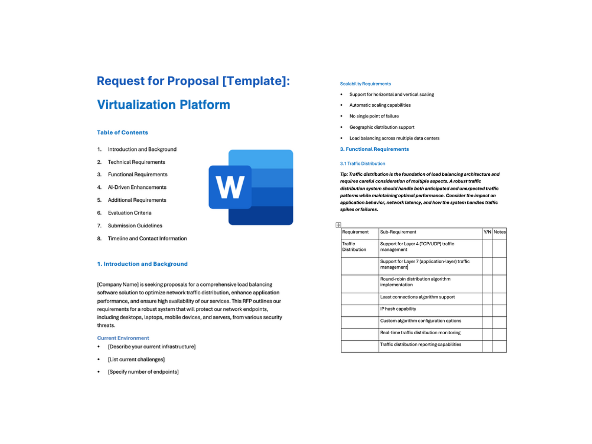
See the structure before you download. The Word file has every section listed below, ready to fill in.
The sections in the document, in order.
Use this virtualization platform RFP template when you're selecting a hypervisor and management platform for data center, branch or edge virtual machines, whether you're replacing your current platform, consolidating clusters or refreshing hardware. It also works as a VMware replacement RFP if that's why you're re-evaluating: migration from your current hypervisor is treated as a core requirement, with its own requirements, vendor questions and proof-of-concept tests.
It's written for the infrastructure, storage, network, security and procurement team running the evaluation, and it covers the whole process: when to issue an RFI first, the requirements to send, the questions that separate vendors, and how to score the answers.
Download the editable Microsoft Word version below. Every requirement, vendor question and scoring weight on this page is in the document, ready to tailor and send.
A virtualization platform or hypervisor RFP involves infrastructure, storage, network, security, backup and application teams at once. Migration is the part that written answers tell you least about, so the proof of concept should move your own VMs and fail your own hosts. The example schedule in this template runs about 12 weeks from kickoff to contract award; allow longer if you need to test several hardware platforms or sites.
Each line is written to paste straight into your RFP. Must-have means a vendor that cannot meet it is out; Nice-to-have earns extra points. Change the priorities to fit your situation, and delete what doesn't apply.
| ID | Requirement | Priority |
|---|---|---|
| F1 | A bare-metal (type 1) hypervisor for x86-64 servers that runs our guest operating systems [list each operating system and version], with a published guest operating system support matrix and the paravirtualized drivers and guest tools each one needs. | Must-have |
| F2 | VM lifecycle management from the console and API: create, clone, convert to and deploy from templates, snapshot, resize, and hot-add CPU, memory, disks and network adapters where the guest operating system supports it. | Must-have |
| F3 | Live migration of running VMs between hosts in a cluster, and of their disks between storage locations, without downtime. Include live migration between hosts with different CPU generations through a CPU compatibility setting, state the limits on concurrent migrations, and state whether live migration between clusters is supported. | Must-have |
| F4 | High availability that automatically restarts VMs on surviving hosts after a host failure, with restart priority and order, admission control that reserves capacity for [number] host failures, and VM-to-VM and VM-to-host affinity and anti-affinity rules that high availability respects. | Must-have |
| F5 | Documented, configurable high availability behavior for host isolation, network partition and loss of storage access, including how the cluster detects failures (heartbeats, quorum or a witness) and how it prevents the same VM from running on two hosts at once. State the expected time from a host failure to VM restart. | Must-have |
| F6 | Maintenance mode that evacuates a host through live migration, so it can be patched, upgraded or replaced without VM downtime. | Must-have |
| F7 | Automatic load balancing that moves VMs between hosts based on CPU and memory use, with settings for how often and how aggressively it acts. | Nice-to-have |
| F8 | Import tooling that migrates VMs from our current hypervisor [name the platform and version]: it connects to the source platform, converts disks and virtual hardware to the target format, and maps source networks and storage to target networks and storage. List the source platforms and versions supported, and the documented limits of the tooling. | Must-have |
| F9 | Driver and guest tools handling during conversion: installing the paravirtualized storage and network drivers the target platform needs (for example, VirtIO drivers) before or during conversion, removing the source platform's guest tools, and keeping each VM's boot mode (BIOS or UEFI), disk order, MAC addresses and IP settings where we choose. | Must-have |
| F10 | Bulk migration in scheduled waves, with both cold migration and warm migration (copying data while the source VM keeps running, then a final sync and a short cutover). State the expected downtime per VM for each method and what it depends on. | Must-have |
| F11 | A rollback path for every migrated VM: the source VM stays intact and can be powered back on if the migrated copy fails validation, plus a per-VM migration report showing what was converted, changed or skipped. | Must-have |
| F12 | Performance and health monitoring for VMs, hosts, clusters and storage (CPU, memory, storage latency and throughput, and network use), with configurable alerts and at least [period] of history. | Must-have |
| F13 | Capacity planning: forecasts of when CPU, memory and storage will run out, right-sizing recommendations for over- and under-sized VMs, and what-if modeling for new workloads or hosts. | Nice-to-have |
| F14 | GPU passthrough and shared virtual GPU support for [VDI, AI or graphics workloads], on GPUs whose vendor supports the platform. State the supported GPU families and any separate GPU software licensing. | Nice-to-have |
| ID | Requirement | Priority |
|---|---|---|
| T1 | One console and API to manage every cluster and site in scope. State whether the management plane runs as a VM or appliance, is distributed across the hosts, or is a vendor-hosted service; how it is made highly available; and what keeps working (running VMs, high availability restarts, live migration) while it is unavailable. | Must-have |
| T2 | Support for our server hardware [list server models, CPUs, network adapters and storage controllers], with a published hardware compatibility list. State whether servers of different generations or manufacturers can be mixed in one cluster, and any limits that creates. | Must-have |
| T3 | Documented configuration maximums (hosts per cluster, VMs per host and per cluster, and vCPUs, memory and disk size per VM) that meet our needs: [numbers]. State the minimum cluster size, and whether two-node clusters with a witness are supported for small sites. | Must-have |
| T4 | External SAN and NAS storage over the protocols we use [iSCSI, Fibre Channel, NVMe over Fabrics including NVMe over TCP, NFS], with multipathing and a published storage compatibility list. Confirm support for [list the storage arrays in use]. | Must-have |
| T5 | Hyperconverged storage that pools the hosts' local drives, with replication or erasure coding across hosts, configurable failure domains, deduplication and compression, and documented behavior during drive failure, host failure and rebuild. Make this Must-have if you plan a hyperconverged design. | Nice-to-have |
| T6 | Thin provisioning, VM snapshots and space-efficient clones on every supported storage type. State snapshot limits and their performance impact, and whether storage quality-of-service limits can be set per VM or per disk. | Must-have |
| T7 | Virtual networking with VLAN-tagged networks (IEEE 802.1Q), virtual switch configuration defined once and applied to every host in a cluster, NIC teaming and link aggregation (LACP), jumbo frames, and IPv4 and IPv6 for VM and management traffic. | Must-have |
| T8 | Software-defined networking: overlay networks (for example, VXLAN or Geneve) that span hosts and clusters, virtual routing, IP address management, and optional BGP EVPN peering with our physical network. | Nice-to-have |
| T9 | VM-level firewalling: rules enforced at each VM's virtual network interface, managed centrally, and kept with the VM when it moves to another host. State whether rules can be based on tags or groups for micro-segmentation, and whether traffic flow visibility is included to help build rules. | Must-have |
| ID | Requirement | Priority |
|---|---|---|
| I1 | A documented backup API that supports image-level, incremental VM backups (snapshot-based, with changed block tracking or an equivalent) and application-consistent snapshots through a guest agent. Confirm support by our backup software [name and version], and list the backup products that officially support the platform today. | Must-have |
| I2 | Built-in VM backup to S3-compatible object storage, with support for object lock so copies can't be changed or deleted, for sites or workloads without a separate backup product. | Nice-to-have |
| I3 | A documented REST API (for example, with an OpenAPI description) covering every function available in the console, plus event notifications or webhooks for VM, host and alarm events. | Must-have |
| I4 | A Terraform provider and a command-line interface for managing VMs, networks, storage and cluster settings as code. State whether the Terraform provider is maintained and supported by the vendor. | Must-have |
| I5 | VM templates with first-boot customization through cloud-init for Linux guests and an equivalent mechanism for Windows guests (hostname, network settings, users, SSH keys and scripts). | Must-have |
| I6 | Single sign-on to the console and API through SAML 2.0 or OIDC with our identity provider, mapping identity-provider groups to platform roles. | Must-have |
| I7 | Streaming of audit, event and host logs to our SIEM over syslog, export of metrics to our monitoring tools (for example, in a Prometheus-compatible format or through the API), and alerts by email, webhook and our ticketing (ITSM) platform. | Must-have |
| I8 | Kubernetes alongside VMs: a supported way to run Kubernetes clusters on the platform, including a CSI driver for persistent volumes, or to run containers and VMs side by side under one management plane. | Nice-to-have |
| ID | Requirement | Priority |
|---|---|---|
| S1 | Role-based access control with built-in and custom roles, scoped to clusters, resource groups or folders, and individual VMs, including a read-only role for auditors. | Must-have |
| S2 | Multi-factor authentication for every interactive administrative login, scoped and expiring API tokens for automation, and local emergency (break-glass) accounts that are logged when used. State whether host shell and SSH access can be disabled or restricted, and confirm that their use is logged. | Must-have |
| S3 | An audit log of every login, configuration change, VM operation and API call, with user attribution, retained for [period] and exportable. | Must-have |
| S4 | UEFI secure boot for hosts, so only signed hypervisor code loads, and a published hardening guide. State whether TPM 2.0-based attestation of host integrity is supported. | Must-have |
| S5 | Secure boot and a virtual TPM 2.0 for guest operating systems that require them, with virtual TPM state protected when VMs are migrated, cloned, backed up or restored. | Must-have |
| S6 | Encryption of VM disks and platform storage at rest, with keys held in our external key manager (for example, through KMIP), and encryption in transit (TLS 1.2 or higher) for management, API, live migration and storage replication traffic. State how keys are handled when encrypted VMs are migrated, replicated or backed up. | Must-have |
| S7 | A published vulnerability response process: security advisories with CVE identifiers and severity ratings, a stated target time to release fixes for critical vulnerabilities, and patches that can be applied through rolling updates without VM downtime. State how customers are notified. | Must-have |
| S8 | For any vendor-hosted management or telemetry service: a current SOC 2 Type II report or ISO/IEC 27001 certification, a data processing agreement, a list of sub-processors, a choice of region, a contractual time limit for notifying us of security incidents, a description of the data collected, and whether telemetry can be turned off. | Must-have |
| S9 | Use of FIPS 140-validated cryptographic modules, and a software bill of materials (SBOM) for the hypervisor and management components on request. Make the FIPS requirement Must-have if you are a public-sector or regulated buyer that requires it. | Nice-to-have |
| ID | Requirement | Priority |
|---|---|---|
| M1 | A migration plan based on discovery of our current environment: VM inventory and dependencies, guest operating system support, sizing for the new clusters, migration waves with downtime windows, and validation and rollback criteria for each wave, with named roles and the effort expected from both sides. | Must-have |
| M2 | Identification of who delivers the implementation and migration (vendor, partner or both) and the named team's experience migrating from our current hypervisor at a similar scale. | Must-have |
| M3 | A pilot migration of [number] representative VMs, including [named critical applications], before production waves begin, with the downtime for each VM recorded. | Must-have |
| M4 | 24×7 support for critical issues, with response-time targets by severity for each support tier. State what each tier includes, and whether the vendor or a partner provides first-line and escalation support. | Must-have |
| M5 | A published product lifecycle policy: release cadence, how long each major release receives security patches and support, the minimum notice given before end of support, and supported upgrade paths between releases. | Must-have |
| M6 | Rolling upgrades of hosts and management components without VM downtime, with a documented pre-upgrade check and rollback procedure. | Must-have |
| M7 | Administrator training and documentation, with certification options for our staff and runbooks for common operations and recovery tasks. | Nice-to-have |
| ID | Requirement | Priority |
|---|---|---|
| C1 | Pricing broken down by component (hypervisor and management, software-defined storage, networking and micro-segmentation, optional modules and support), with the license metric for each (per CPU socket, per physical core, per host, per VM or per unit of capacity), the term, and list price, discount and net price. | Must-have |
| C2 | Pricing applied to our actual hardware [number of hosts, with sockets and cores per host], including any minimum quantities per CPU, per host or per contract. | Must-have |
| C3 | A list of what each edition includes, identifying every feature in this proposal that needs a higher edition or a separately priced add-on. | Must-have |
| C4 | A commitment that the license metric and edition contents won't change during the term without our agreement, and a cap on price increases at renewal. State the cap. | Must-have |
| C5 | A clear statement of what happens if we don't renew a subscription: whether existing workloads keep running, and which features, updates, security patches and support stop. | Must-have |
| C6 | Prices for adding hosts, cores or modules mid-term, co-terminated with the main agreement. | Must-have |
| C7 | Pricing that ramps with the migration waves, so we don't pay for full capacity before workloads have moved. | Nice-to-have |
| C8 | Exit terms covering export of VMs and their disks in open or documented formats (such as OVF) at no extra charge, plus transition assistance at the end of the contract. | Must-have |
These questions are designed to separate vendors, not to collect brochure answers. Ask for evidence: a demo, a document or a reference.
Score each criterion from 1 to 5, multiply by its weight, and add the results. The weights below are a starting point; agree on your own before any proposals arrive so the scoring can't be bent around a favorite.
| Criterion | Weight | What a strong response shows |
|---|---|---|
| Compute, high availability and live migration | 20% | Every Must-have met in a generally available release, with failure behavior documented and shown in the proof of concept by powering off one host and isolating another. |
| Migration from the current hypervisor | 20% | Tooling that supports your source version, documented limits, downtime per VM measured on your own workloads, working driver handling and a tested rollback. |
| Storage and networking | 15% | Support for your storage design, protocols and arrays, VLAN and overlay networking, and VM-level firewalling, with any add-on licensing stated up front. |
| Security and product lifecycle | 10% | SSO with MFA, granular roles, complete audit logs, encryption with your key manager, a documented patch process with fast fixes, and a published lifecycle policy. |
| Automation, backup and integration | 10% | A complete REST API, a supported Terraform provider, cloud-init templates, official support from your backup software, and logs and metrics flowing into your tools. |
| Implementation and support | 10% | A credible migration plan, a named team with experience moving from your current hypervisor, and support tiers and response targets that match your availability needs. |
| Commercials and total cost | 15% | Pricing applied to your own hardware over three to five years, clear edition contents and minimums, a stable license metric, a renewal cap and fair exit terms. |
| Total | 100% |
Scoring scale
Your current environment (hosts, VMs, guest operating systems, storage and network design) and what must be migrated; requirements for the hypervisor, clustering and high availability, storage, networking, migration tooling, backup integration, automation, security, monitoring and lifecycle, each marked Must-have or Nice-to-have; questions that make vendors show their migration limits and failure behavior; support and pricing terms; and the rubric you'll score with. This template includes all of them.
Start with an inventory of every VM, its guest operating system, its dependencies and how much downtime it can tolerate, then move workloads in waves, beginning with low-risk systems. Ask vendors for import tooling that converts disks and virtual hardware and installs the drivers the new hypervisor needs; warm migration copies data while the source VM keeps running, so downtime is limited to the final cutover. Keep each source VM intact until its migrated copy passes validation, so you can roll back.
Decide before you issue it if you can, because the choice changes the hardware, licensing and failure behavior you're comparing. Hyperconverged storage pools drives inside the hosts, so compute and storage scale together and there's no separate array to manage. External SAN or NAS storage lets you keep arrays you already own and scale storage separately from compute. If you're open to both, say so, and ask vendors to describe and price each design separately.
Ask each vendor to price your actual hardware (hosts, sockets and cores) in whatever metric it uses, whether per socket, per core, per host or per VM, on subscription or perpetual terms, then compare total cost over three to five years. Also require a list of what each edition includes, any minimum quantities, a cap on renewal increases, a commitment that the metric won't change during the term, and a clear statement of what happens if a subscription isn't renewed.
The example schedule in this template runs about 12 weeks from kickoff to contract award, including three weeks for vendor responses and three to four weeks for a proof of concept. The migration itself starts after award, so plan its waves early and make sure they can finish before your current support or subscription term ends.
A free, vendor-neutral RFP for hiring an agency or development partner to build custom software, with user stories, delivery questions, code ownership…
Paste-ready Microsoft 365 backup requirements (Exchange Online, OneDrive, SharePoint, Teams, Entra ID, restore, immutability, legal hold), sharp vendor questions and a scoring…
Paste-ready Kubernetes backup requirements (application-consistent backup, CSI snapshots, cross-cluster restore, immutability, RBAC, GitOps), sharp vendor questions and a weighted scoring rubric.
Please provide your feedback below.
"*" indicates required fields