Information Security Policy Template for IT (Free, Word)
A free, editable information security policy for small and mid-sized organizations, with data classification, access and password rules, AI tool use and…
Word · FreeDownload Template →
A free, vendor-neutral incident response plan template in Word, with roles, a severity matrix, out-of-band contacts, containment approvals, playbooks, evidence and notification logs.
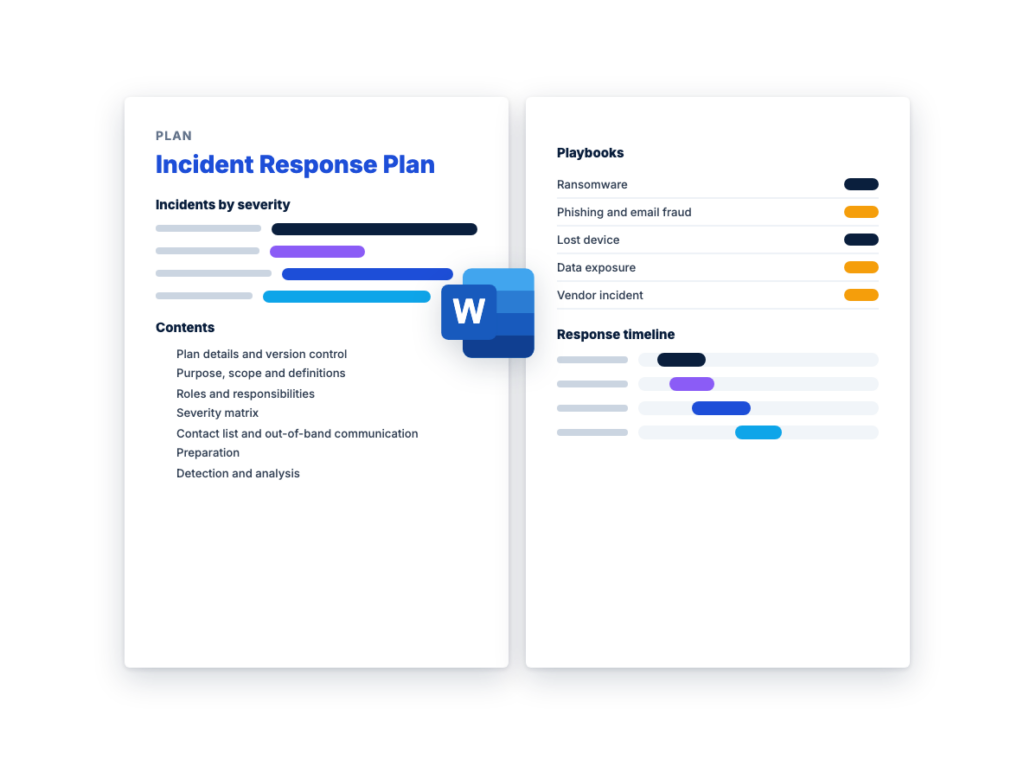
See the structure before you download. The Word file has every section listed below, ready to fill in.
The sections in the document, in order.
Use this incident response plan template to write down how your organization handles a cybersecurity incident: who leads the response, who can approve drastic steps such as taking systems offline, how severity is rated, what to do first for common incidents, and how evidence, notifications and communications are handled. It's written for the IT or security lead writing a first plan, or replacing one that has gone out of date, with sections for legal counsel, communications, HR and outside parties to fill in.
Incident response and disaster recovery work as a pair. When an incident means systems have to be restored, this plan hands off to the free disaster recovery plan template, using the same recovery lead, declaring authority, RTOs and RPOs, after the security lead confirms which recovery points are clean. If an outside provider watches your systems and responds for you, the MDR RFP template covers the response authority and notification terms this plan relies on, and the cybersecurity RFP guide covers buying security services in general.
The Word file is a complete cyber incident response plan, with a severity matrix, triage and scoping checklists, containment approvals, an evidence and chain of custody log, a notification decision log, short playbooks, an incident log and a post-incident review. Its sections follow the familiar phases of incident response, which NIST SP 800-61 Rev. 3 maps to the NIST Cybersecurity Framework 2.0 Functions. It isn't legal advice: legal counsel reviews the plan and decides every notification.
Download the editable Microsoft Word version below. The full text is on this page, so you can read it before you download.
Write one plan for the organization. Fill in Sections 1 to 6 before an incident, adapt the playbooks in Section 14 to your systems, then test the plan with an exercise and record the results in Section 17.
The three plans cover different parts of the same disruption, and they hand off to each other. An incident response plan deals with a cybersecurity incident: finding it, containing it, removing the attacker, preserving evidence, deciding notifications and learning from it. A disaster recovery plan restores the IT systems and data the business depends on after any serious disruption, whether the cause is an attack, a failed data center or a flood. A business continuity plan keeps business processes running in the meantime, through people, workplaces, suppliers and manual workarounds.
In a ransomware attack, all three can run at once. The incident response plan leads, because the attacker may still be inside and recovery points have to be confirmed clean before anything is restored. NIST SP 800-61 Rev. 3 lists starting the business continuity and disaster recovery plans, as needed, as part of carrying out the incident response plan, and recommends keeping business continuity plans in step with incident response plans.
NIST SP 800-61 is NIST’s guidance on cybersecurity incident response. The current version is Rev. 3, Incident Response Recommendations and Considerations for Cybersecurity Risk Management: A CSF 2.0 Community Profile, published in April 2025. It replaced Rev. 2, the Computer Security Incident Handling Guide from 2012, which NIST has withdrawn. Organizations outside the federal government can use it voluntarily, and it’s meant for organizations regardless of sector or size.
Rev. 3 is a different kind of document. Instead of detailed guidelines for handling incidents, it organizes recommendations and considerations around the six NIST Cybersecurity Framework (CSF) 2.0 Functions. Govern, Identify and Protect are the preparation that supports incident response, Detect, Respond and Recover are the response itself, and lessons learned from all of them feed the Improvement category in Identify. NIST says each organization should use the incident response life cycle model that fits it.
Rev. 3 also suggests naming an incident lead for each incident, recommends checking backups for signs of compromise before restoring from them, and recommends giving third parties a way to report incidents. This template builds each of those in. It uses Rev. 2’s four phases as section headings, because they’re easy to follow during an incident, and Rev. 3 itself maps them to the CSF Functions:
This is the complete text of the Word document. Fill in the [bracketed] placeholders and delete the italic guidance before you use or send it.
Instructions: replace every [bracketed placeholder] and example
row, and delete what doesn’t apply and the italic guidance. Fill in
Sections 1 to 6 before an incident. During one, work from Sections 7 to
14 and record everything in Section 15. This plan isn’t legal advice:
legal counsel reviews it and decides every notification.
The headings use the phases from NIST SP 800-61 Rev. 2, withdrawn
in April 2025. Its replacement, SP 800-61 Rev.
3, organizes incident response around the NIST Cybersecurity
Framework (CSF) 2.0 Functions and maps the old phases to them.
| Item | Details |
|---|---|
| Organization | [Legal name] |
| Plan owner | [Name and title, e.g. IT manager or security lead] |
| Executive sponsor | [Name and title] |
| Approved by | [Senior leadership: name, title and date] |
| Reviewed by legal counsel | [Name and date] |
| Version and effective date | [Version], [date] |
| Next full review due | [Date] |
| Related plans | [Disaster recovery, business continuity and crisis communications plans: owners and locations] |
CISA’s Incident
Response Plan Basics describes the plan as formally approved by
senior leadership, and advises reviewing it with an attorney.
| Version | Date | Changed by | What changed | Approved by |
|---|---|---|---|---|
| [Version] | [Date] | [Name] | [First issue, or the sections changed and why] | [Name] |
During an incident, email, chat and file shares may be down or
watched by the attacker. Give everyone with a role a printed copy of
this plan and the call order in Section 5, and keep an offline
electronic copy. Mark it confidential and replace every copy at each
update.
| Copy holder | Format | Where it’s kept | Version held |
|---|---|---|---|
| [Name, incident lead] | [Print / offline electronic] | [Location] | [Version] |
| [Name, executive sponsor] |
This plan sets out how [Organization] prepares for, detects,
contains, eradicates and recovers from cybersecurity incidents: who
leads, who approves high-impact decisions, and how evidence,
notifications, communications and the review after each incident are
handled.
| Item | Details |
|---|---|
| Systems and data | [Networks, servers, endpoints including personal devices used for work, cloud accounts, SaaS services, data and sites] |
| People | [Employees, contractors and third parties with access] |
| Out of scope | [e.g. outages with no security cause, handled by the service desk] |
| Plans this plan can trigger | [Disaster recovery, business continuity and crisis communications plans] |
| Term | Meaning in this plan |
|---|---|
| Event | Any observable occurrence involving computing assets, such as a sign-in attempt or a software update. |
| Adverse event | An event with a negative consequence. Adverse events are analyzed to decide whether an incident has occurred. |
| Security incident | An occurrence that actually or imminently jeopardizes, without lawful authority, the confidentiality, integrity or availability of information or an information system, or that violates or imminently threatens to violate law, security policies, security procedures or acceptable use policies (the definition NIST SP 800-61 Rev. 3 uses, from federal law). |
| Incident | Short for security incident. Response under this plan starts when the incident lead declares one (Section 15). |
| Severity | The rating in Section 4, set by business impact. It decides who is told and how often. |
| Data breach | A legal term defined differently by different laws and contracts. Legal counsel decides whether an incident is one. Until then, records and messages say “incident”. |
Name a primary and an alternate for every role. One person can
hold several roles in a small organization, but in a serious incident
the incident lead coordinates rather than doing the technical
work.
| Role | Responsibilities | Primary: name and phone | Alternate: name and phone |
|---|---|---|---|
| Executive sponsor | Approves the decisions in Section 8.3, spending and outside help. Briefs leadership and the board |
||
| Incident lead (also called incident commander or incident response lead) |
Declares incidents, sets severity, runs the response, assigns tasks, decides when to close |
||
| Security lead | Leads investigation, containment and eradication, directs evidence collection, confirms which recovery points are clean |
||
| IT lead | Carries out actions on systems, accounts and networks, and works with the disaster recovery plan’s recovery lead |
||
| Legal counsel | Decides notifications (Section 11), advises on legal privilege, handles law enforcement and regulators, reviews external statements |
||
| Privacy lead | Works out whose personal data is involved, and what kind | ||
| Communications lead | Drafts and sends approved messages (Section 12) | ||
| HR lead | Staff matters, including incidents that may involve an employee | ||
| Finance contact | Calls the bank in payment fraud, tracks costs for the insurer | ||
| System and data owners | Advise on business impact, confirm restored systems work | ||
| Scribe | Keeps the incident log (Section 15) |
Agree these before an incident. Read the insurance policy now:
what it says about notice, which firms you may use, and whether costs
need approval first.
| Party | What they do | Contract or policy reference | How to engage, and who may | Primary and alternate contact |
|---|---|---|---|---|
| Incident response firm or retainer | Forensics, containment support, extra staff | [Retainer terms] | [Hotline. [Role] may engage] | |
| Cyber insurer | Claim notice and, depending on the policy, approved firms and cost approval |
[Policy number] | [Claims line. [Role] notifies] | |
| Law enforcement | [e.g. local FBI field office or local police] | [Legal counsel decides whether to report] | ||
| CISA | Reporting and assistance | [Regional contact] | ||
| Managed security or IT provider | [Monitoring, and the actions it may take without asking] | [Contract and response authority] |
CISA advises getting to know local police or FBI contacts in
advance, in coordination with your attorney. To buy a managed detection
and response service, see RFPhub’s free MDR
RFP template.
Rate on what’s known, re-rate as facts change, and use the higher
level when unsure. Weigh how critical the affected systems are, the
effect on operations, the data involved, how far the attacker has got
and how hard recovery will be: the risk evaluation factors NIST SP
800-61 Rev. 3 gives as examples.
| Severity | Definition by business impact | Example | Who is told | Update cadence |
|---|---|---|---|---|
| Critical | Critical operations stopped or at serious risk, sensitive data likely taken, or an attacker active with privileged access |
Ransomware spreading across servers | Every role in Section 3.1, the insurer and the incident response firm |
Every [time] |
| High | A critical system or sensitive data at risk, or part of the business disrupted, with the spread contained |
An attacker used an administrator account; a payment sent to a fraudster |
Executive sponsor, incident lead, security, IT, legal counsel, system owners |
Every [time] |
| Medium | Limited impact on non-critical systems or a few users, and no sign of sensitive data taken |
One mailbox taken over through phishing, now contained | Incident lead, security, IT, system owner | Every [time] |
| Low | Minimal impact, handled by standard procedures | Malware blocked on one laptop; a phishing email reported, not clicked |
Security lead | At closure |
Each person calls the people below them, and the incident lead
confirms everyone has been reached. Include personal or backup numbers,
because work phones may depend on systems that are down.
| Who calls | Whom | Primary contact | Backup contact | If no answer within [time] |
|---|---|---|---|---|
| Whoever receives the report | Security lead | [Phone] | [Phone or text] | Call the incident lead |
| Security lead | Incident lead | Call the alternate | ||
| Incident lead | Executive sponsor, legal counsel and the roles the severity requires |
Call each alternate | ||
| Legal counsel or [role] | Insurer, incident response firm |
Switch to these when the attacker may be able to read email, chat
or calendars, or when they’re down. CISA’s #StopRansomware Guide advises
out-of-band methods such as phone calls, so the attacker isn’t tipped
off. Never send passwords or recovery codes where the attacker might see
them.
| Channel | Use | Details | Last tested |
|---|---|---|---|
| Phone bridge | Response team coordination | [Number and access code, on a service separate from your main accounts] |
[Date] |
| Out-of-band messaging | Updates between responders | [A group set up outside the main identity system] | |
| Meeting place | When remote tools are down | [Location] |
Complete this checklist before an incident, and recheck it every
[interval].
| Area | Check | Done | Owner |
|---|---|---|---|
| Logging | Logs from [identity, email, endpoints, firewalls, remote access, cloud and SaaS admin activity] are collected centrally, kept for [period], time-synchronized and protected from deletion |
☐ | |
| Backups | Critical data has offline or immutable backups, tested under the disaster recovery plan |
☐ | |
| Tools and access | Section 6.1 is current, and responders have practiced with the tools |
☐ | |
| Break-glass accounts | Emergency administrator accounts in [location] work when the main identity provider is down |
☐ | |
| Evidence storage | A secure, access-controlled place for evidence: [location] | ☐ | |
| Authority to isolate | The approvals in Section 8.3 are signed by the executive sponsor |
☐ | |
| Outside help | The retainer, insurance terms and law enforcement contact in Section 3.2 are current |
☐ | |
| Reporting | Staff know how to report a suspected incident: [phone, email, report button]. Reporting is never punished, false alarms included |
☐ | |
| Messages | Holding statements and templates for Section 12 are approved | ☐ |
| Tool or access | Used to | Where it is, or who holds it | Who can use it |
|---|---|---|---|
| [Endpoint security console] | Isolate devices and collect data | ||
| [Log search or security monitoring] | Search and preserve logs | ||
| [Identity and email admin consoles] | Disable accounts, revoke sessions, remove messages, check forwarding rules |
||
| [Cloud admin consoles] | Take snapshots, revoke access keys | ||
| [Evidence tools] | Disk and memory capture, hashing | ||
| [Clean laptop and encrypted drives] | A trusted device for responders, and evidence storage |
NIST SP 800-61 Rev. 3 recommends giving third parties a way to
report possible incidents, and taking those reports seriously.
| Source | Who watches it | How it reaches the security lead |
|---|---|---|
| Security monitoring alerts [endpoint, email, identity, network, cloud] |
[Security team or managed provider] | |
| Staff reports | Service desk | |
| Reports from vendors, customers, partners, law enforcement or the public |
[Service desk, legal counsel] | |
| Unusual requests, such as a change of bank details | Finance |
| Step | Check | Done (time) |
|---|---|---|
| Record | Who reported it, how, and when it was seen and reported | |
| Verify | Confirm whether it’s a security incident, a false alarm or a service problem |
|
| Preserve | Before changing anything, keep what could be lost: screenshots, short-retention logs, and a snapshot or memory capture if the security lead asks |
|
| Declare and rate | The incident lead declares the incident, records the time and sets the severity (Section 4) |
|
| Choose channels | If the attacker could see normal channels, move to Section 5.2 | |
| Mobilize | Call the people the severity requires, and open the record in Section 15 |
Prioritize by impact, not order of arrival. Update the answers as
facts come in, and check systems not yet known to be affected for the
same signs: underestimating scope lets an incident continue
unnoticed.
| Question | What’s known | How it was confirmed | Still open |
|---|---|---|---|
| Which accounts, devices, systems and cloud services are affected, and how critical are they? |
|||
| What is the effect on operations now, and what will it be at [time]? |
|||
| When did the activity start, and how did the attacker get in? | |||
| Is the attacker still active, and are the same signs on other systems? |
|||
| What data was accessed, changed or copied out, and whose personal data is involved? |
|||
| Are backups, logs, security tools or third parties affected? | |||
| Can it be handled with existing resources, or does it need outside help? |
Stop the spread and keep the evidence. Isolate systems in a
coordinated way: an attacker who notices the response may spread further
before systems are cut off. Log every action in Section 15.
Temporary measures keep the business running while eradication
and recovery are prepared. Record how long each is meant to stay, from
an emergency workaround to a permanent fix, and who removes it.
Agree in advance which actions the incident lead may take at
once. NIST SP 800-61 Rev. 3 notes that leadership may hold
decision-making authority on high-impact actions, such as shutting down
or rebuilding critical services.
| Decision | Pre-approved for the incident lead | Who approves otherwise | Alternate approver |
|---|---|---|---|
| Isolate individual devices or disable individual accounts | [Yes] | ||
| Take a business-critical system or site offline | [Yes / No] | [Executive sponsor] | |
| Disconnect from the internet, or disable remote access or single sign-on for everyone |
[No] | [Executive sponsor] | |
| Reset credentials across the organization, or all privileged credentials |
[Yes / No] | [Executive sponsor, IT lead] | |
| Suspend payments or another business process | [No] | [Executive sponsor] | |
| Engage the incident response firm | [Yes / No] | [Executive sponsor, with the insurer’s consent if the policy requires it] |
|
| Watch the attacker before containing, to gather evidence | No | [Executive sponsor, after discussion with legal counsel] | |
| Any contact with the attacker, or any payment to them | No | [Executive sponsor, with legal counsel and the insurer] |
Approved by the executive sponsor: [Name, signature and date]
When systems or data must be restored or rebuilt, the incident
lead asks the recovery lead to activate the disaster
recovery plan. Its declaring authority decides whether to declare a
disaster, and its recovery order, RTOs and RPOs apply. This plan still
runs the investigation, evidence and communications.
| Step | Action | By |
|---|---|---|
| Decide | Agree which systems to restore, in what order, and whether the disaster recovery plan is activated |
Incident lead, recovery lead |
| Check the recovery point | Before using a backup, image or template, check it for signs of compromise or corruption, and confirm it’s clean |
Security lead |
| Restore cleanly | Restore into a clean, isolated environment and add only systems confirmed clean, so nothing is reinfected |
IT lead |
| Check before going live | Check restored systems for signs of compromise, and confirm the root cause is fixed before production use |
Security lead |
| Confirm and monitor | The system owner confirms it works. Watch it closely for [period] |
System owner, security lead |
The incident lead closes the incident, and records the time in
Section 15, when:
Not every incident needs formal chain of custody, but treat
collected data as evidence an insurer, regulator or court may need.
Collect it under procedures legal counsel agrees, preserve volatile
evidence such as memory first, and record every change of hands with
both signatures. Restrict incident records to the response
team.
| Evidence ID | Description and identifiers (hostname, serial number, account, IP address) |
Collected by, date and time (with time zone) | How collected, and hash value | Storage location | Transferred from and to, date and time | Signatures |
|---|---|---|---|---|---|---|
| [Incident ID]-E[sequence] |
Legal counsel decides which notifications laws, regulations,
contracts and insurance policies require, to whom, with what content and
when. This plan sets no deadlines: they depend on the law, sector,
location and contract. Start the log as soon as personal, regulated or
customer data may be involved, without waiting for the investigation to
end.
Some sectors have their own rules. For example, national banks,
federal savings associations and their bank service providers have a
federal computer-security incident notification rule (12 CFR
part 53). Legal counsel confirms which rules apply.
| Party | Required, contractual or voluntary, and the basis | Decision and who decided | Decided (date and time) | Sent by, date and method |
|---|---|---|---|---|
| Regulators | [Legal counsel decides] | |||
| Affected individuals | ||||
| Customers and partners, including businesses whose data [Organization] holds |
||||
| Cyber insurer | [Policy notice terms] | |||
| Law enforcement and CISA | ||||
| Board, investors or lenders |
Only approved people speak for the organization, and legal
counsel reviews external messages first. Draft a holding statement in
advance, for questions that come before the facts. Each message says
what’s known, what’s affected, what’s being done, what the reader should
do and when the next update comes. Don’t speculate about cause or
blame.
| Audience | What they need | Who tells them | Approved by | Channel and timing |
|---|---|---|---|---|
| Response team | Tasks, priorities, decisions | Incident lead | [Out-of-band channel], every [time] | |
| Leadership and board | Impact, decisions needed, costs | Incident lead, executive sponsor | As Section 4 sets | |
| Staff | What’s affected, what to do and not do | Communications lead, HR lead | Incident lead | [Text alert, intranet, phone] |
| Customers and partners | What’s affected and what they should do | Communications lead, account owners | Legal counsel, executive sponsor | [Status page, email] |
| Regulators, insurer, law enforcement | As decided in Section 11 | Legal counsel | ||
| Media | Approved statements only | [Approved spokesperson] | Legal counsel, executive sponsor |
When a vendor reports an incident, or one is suspected, the
security lead handles it under this plan and the third-party
risk management policy: log it, re-rate the vendor’s risks and start
an early review. The contract’s security incident notification terms,
such as Section 11 of RFPhub’s service
level agreement template, set what the vendor must tell you and
when. NIST CSF 2.0 includes relevant suppliers in incident planning,
response and recovery: list them here and bring critical ones into
exercises.
| Third party | Service, and access to systems or data | Security contact, including out of hours | Notice terms (contract section) | What [Organization] needs from them |
|---|---|---|---|---|
| [Managed service provider] | [Logs, indicators of compromise, actions taken] | |||
| [Cloud and SaaS providers] | ||||
| [Bank or payment processor] |
First steps and decisions for common incidents, to adapt to your
systems. NIST SP 800-61 Rev. 3 suggests documenting procedures for the
most common incident types.
See CISA’s #StopRansomware
Guide and its response checklist.
| Item | Details |
|---|---|
| Incident ID and title | [Prefix]-2026-[sequence]: [short description] |
| Reported by, how and when | |
| Detected, and declared (dates, times, by whom) | |
| Incident lead | |
| Severity, and each change with its time | |
| Type | [Ransomware / phishing / business email compromise / lost device / data exposure / vendor / other] |
| Systems, accounts and data affected | |
| Indicators of compromise | [Addresses, domains, file hashes, accounts] |
| Status | [Analysis / containment / eradication / recovery / closed] |
| Closed (date, time, by whom) and review date |
Record facts, actions and decisions as they happen, with the time
zone. Write facts, not guesses.
| Date and time (time zone) | Fact, action or decision | By | Evidence ID |
|---|---|---|---|
| Action | Owner | Due | Status | Next step |
|---|---|---|---|---|
Hold a review within [time] of closing every Critical or High
incident, and others when there’s something to learn. Keep it blameless:
the aim is to fix processes and systems, not to blame someone. Act on
lessons as soon as they’re found, and share findings with staff as far
as legal counsel allows.
| Item | Notes |
|---|---|
| Summary and timeline | [From Section 15] |
| Root cause, including underlying gaps in controls or process | |
| How it was detected, and how it could be detected sooner | |
| What worked, and what didn’t: slow decisions, missing contacts or access, unclear roles |
|
| Impact and cost | |
| Changes to this plan, the playbooks and other plans |
| Finding | Action | Owner | Due date | Status |
|---|---|---|---|---|
CISA offers no-cost tabletop
exercise packages with scenarios including ransomware, phishing and
insider threats, plus templates for planning the exercise and the
after-action report. Include critical suppliers, the incident response
firm and the insurer where you can.
| Exercise | What it involves | Frequency | Next date | Owner |
|---|---|---|---|---|
| Contact and channel test | Run the call order and use each out-of-band channel | Every [interval] | ||
| Tabletop exercise | A facilitator walks the team through a scenario, such as [ransomware]. Discussion only |
Every [interval] | ||
| Technical exercise | Practice isolating a device, collecting evidence or restoring from backup |
Every [interval] |
| Date and exercise | What worked | Gaps found | Actions, owners and dates |
|---|---|---|---|
Review the whole plan every [interval] and the call order more
often. Record changes in Section 1.1 and replace the copies in Section
1.2. NIST SP 800-61 Rev. 3 recommends keeping business continuity plans
in step with incident response plans.
| Trigger | What to update | Owner |
|---|---|---|
| An incident or exercise finds a gap | The sections affected | Plan owner |
| Someone joins, leaves or changes role | Sections 1.2, 3 and 5 | Plan owner |
| A new critical system, cloud service or vendor | Sections 6, 7.1 and 13 | IT lead, security lead |
| The retainer, insurance policy or a managed service contract changes |
Sections 3.2 and 8.3 | Plan owner |
| The laws, regulations or contracts that apply change | Section 11 | Legal counsel |
| The disaster recovery or business continuity plan changes | Section 9.2 | Plan owner |
It should name who leads the response, who can approve high-impact actions such as taking systems offline, and a primary and an alternate for every role, including outside parties such as an incident response firm and the cyber insurer. It needs a severity matrix, contact details with an out-of-band channel, and checklists for detection, triage, containment, eradication and recovery, with rules for handling evidence. It also covers notification decisions by legal counsel, communications by audience, playbooks for common incidents, post-incident reviews, and how the plan is tested and kept current.
NIST SP 800-61 Rev. 2 described four phases: preparation; detection and analysis; containment, eradication and recovery; and post-incident activity. NIST replaced it in April 2025 with Rev. 3, which organizes incident response around the six NIST CSF 2.0 Functions, with Govern, Identify and Protect as preparation, Detect, Respond and Recover as the response, and lessons learned feeding improvement throughout. Rev. 3 maps the old phases to those Functions, so a plan can use either structure.
An incident lead who runs the response, a security lead and IT staff who do the technical work, legal counsel, a privacy lead, a communications lead, HR and an executive sponsor who approves high-impact decisions. System and data owners advise on business impact and confirm recovered systems work. The plan should also name outside parties, such as an incident response firm or retainer, the cyber insurer, a law enforcement contact and key vendors, each with a contact and an alternate.
Set the frequency yourself, test the contact list more often than the rest, and run tabletop exercises on the scenarios most likely to affect you. Update the plan after every significant incident and exercise, and whenever people, critical systems, vendors, insurance or the rules that apply to you change. Some regulations, frameworks and contracts set a minimum for the organizations they cover, so check which apply to you.
An incident response plan deals with a cybersecurity incident: detecting it, containing it, removing the attacker, preserving evidence and deciding notifications. A disaster recovery plan restores IT systems and data after any serious disruption, whether the cause is an attack, a failed data center or a natural disaster. They meet at recovery, where the incident response plan confirms which recovery points are clean and the disaster recovery plan restores systems in the agreed order.
A free, editable information security policy for small and mid-sized organizations, with data classification, access and password rules, AI tool use and…
A free, vendor-neutral business continuity plan template in Word, with a BIA worksheet, process priorities, continuity strategies, crisis management, communications and an…
A free, editable third-party risk management (TPRM) policy for private organizations: roles, a vendor inventory, risk tiers, due diligence, contract terms and…
Please provide your feedback below.
"*" indicates required fields